Stuart Shopify Integration: Courier Delivery with Bird
Explore with AI
Get AI-powered insights from this article
Your Shopify courier delivery either goes out today or it does not, and the gap between those two outcomes is usually one person with a phone and a stack of orders. The Stuart integration in Bird Pickup & Delivery closes that gap by turning a status change into a courier job. You mark the order dispatched. A rider gets assigned, the customer gets tracking, and nobody in your shop had to open a second tab.
Bird Pickup & Delivery is a Shopify app for scheduling pickup, local delivery and shipping orders. For courier work it connects eligible delivery orders to last-mile providers such as Stuart, and it handles the dispatch, the delivery rates, the tracking and the customer notifications around that handoff.
The Courier Handoff
Five things have to be set before a Shopify order can dispatch itself to a courier.
- Connect Stuart with your API credentials and confirm the connection works
- Scope which store locations can send courier jobs, each with a real contact
- Size your packages so quotes and pickups are accurate
- Dispatch the order in Bird, the one action that creates the courier job
- Track the delivery on the Shopify order, and to the customer if you want
Most shops get one and four right on the first afternoon, then lose a week to two and three. Here is the whole handoff.
How do you integrate Stuart with Shopify?
You connect Stuart to Shopify through Bird Pickup & Delivery. Bird stores your Stuart API credentials, decides which locations and which orders are eligible for courier delivery, and creates the Stuart job the moment you mark an order dispatched.
Stuart is an on-demand courier network covering France, the United Kingdom and Poland. Bird is not a courier. Bird is the layer that decides which orders go out, when they go out, and who collects them, and this is worth being precise about because merchants often expect a scheduling app to own the van too. It does not. You keep a Stuart account, Stuart keeps its own pricing, and Bird connects the two.
Connecting takes a set of API credentials from your Stuart account: a client ID, a client secret, and the environment you want to run against. Bird gives you a Test Connection button before anything saves, so you find out immediately whether the credentials are right rather than discovering it on a live order at 4 PM on a Friday.
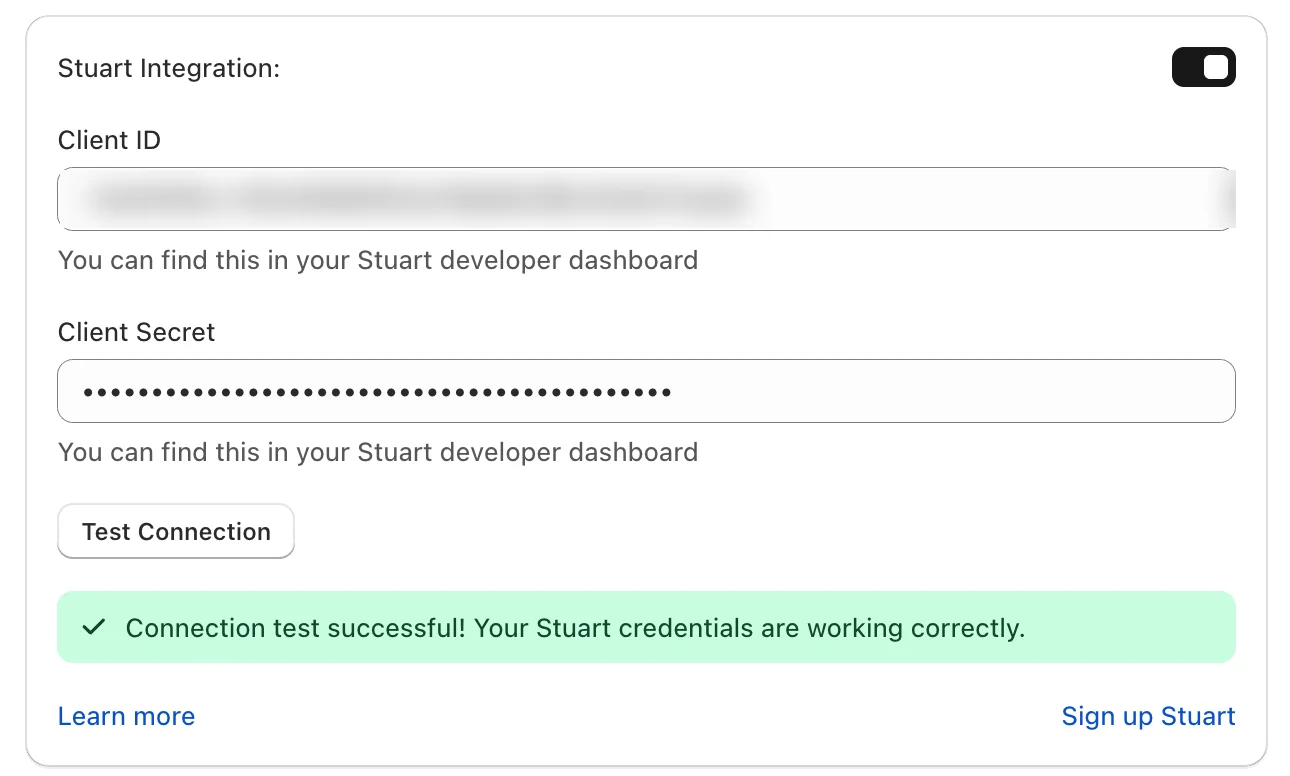
That button stays available afterwards. Any time you rotate credentials, test again before you trust it.
The rest of Bird's last mile delivery layer works the same way. Route planning, driver management and courier dispatch all sit behind the same connection point in the app, which means the order data your customers created at checkout carries through without anyone retyping an address.
Which store locations and package sizes should you enable for Stuart courier delivery?
This is the part that quietly decides whether couriers show up at the right door.
Courier eligibility is set per location, not store-wide. You choose which of your locations can send jobs to Stuart, and each enabled location needs a contact name and a phone number attached. That contact is not paperwork. It is who the rider calls when the loading bay is locked or the address has three identical front doors, so a generic shop mailbox there is a delivery that stalls with nobody to unstick it. If you run multiple locations with different fulfilment models, this is also how you keep a warehouse that ships nationally out of a courier flow built for same-day local work.
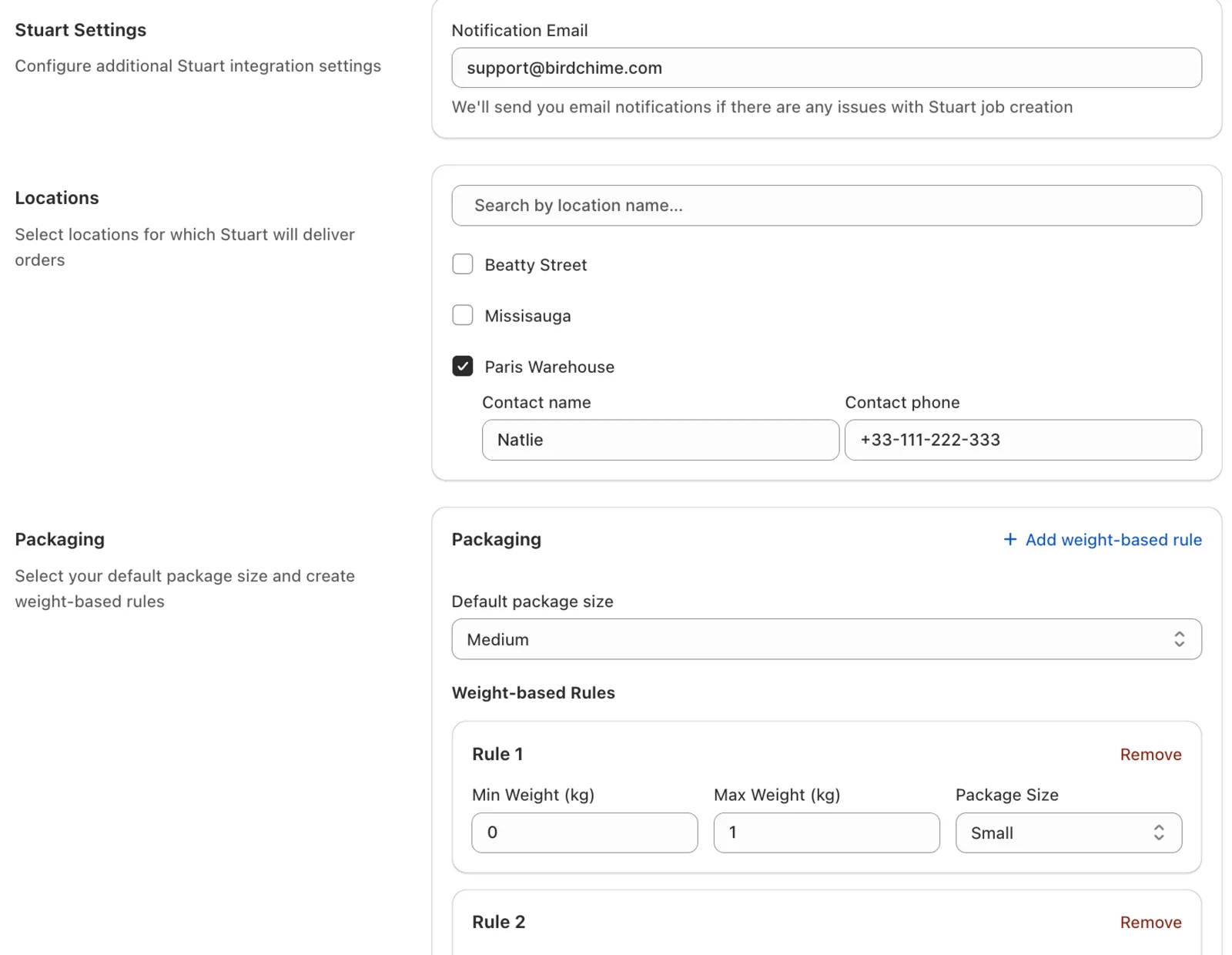
Packaging is the other half. You set a default package size and add weight-based rules on top of it, and those two inputs drive the quote Stuart returns and the vehicle it assigns. Guess low and the price looks great until a rider turns up on a bike for a case of wine. Keep the dimensions and weights honest and both the pricing accuracy and the on-time pickups improve, which is the least glamorous advice in this post and the one that saves the most money.
Bird's own delivery rates engine still governs what the customer pays at checkout. Courier cost and customer price are two separate numbers, and merchants who treat them as one end up subsidising every rush order. If you have not set your own pricing tiers yet, our guide to choosing a delivery rate strategy walks through how to build them around distance, weight and urgency.
What happens when you mark a Shopify order dispatched?
One action. That is the whole trigger.
When an eligible delivery order is marked dispatched, Bird sends it to Stuart for pickup and delivery, and you get a clear success or error message rather than silence. There is no separate courier queue to work through and no export to upload. Your team can mark it from Bird's own order list or from the Shopify order itself, so nobody has to learn a second place to work.
That same status change is doing a second job at the same time, which is the detail most merchants miss. Marking an order dispatched is also what fires Bird's Out for Delivery notification to your customer, so the courier gets the job and the customer gets told in the same motion. If you have SMS notifications switched on, that message lands on their phone while the rider is still collecting. We covered why that timing matters for local orders in our post on SMS notifications for Shopify merchants.
Because dispatch is a status and not a schedule, the time slot your customer picked at checkout is what determines when your team marks it. A florist working a Saturday morning slot dispatches into that window rather than whenever the batch happens to be ready, which is the difference between a delivery promise and a rough estimate. Shops running tight windows tend to find this out during their first peak weekend, and it is why our florist scheduling setup treats slot design as an operations decision rather than a widget setting.
Where does courier delivery work if you sell outside the UK, France and Poland?
Stuart covers three countries well. If your shop is not in one of them, that used to be the end of the conversation.
It is not any more. Bird now connects to last-mile couriers directly from the app across a growing list of providers, with Jitsu covering the USA and Trexity covering the USA and Canada, and more couriers rolling out. Setup for these follows the same shape as Stuart: supply the courier's API key, and Bird handles rate quoting, dispatch and tracking from there. Bird also detects on its own whether the credentials you pasted are production or sandbox, which removes the single most common way a test order ends up dispatched for real.
The practical read for a merchant: pick the courier that actually serves your city. Credentials differ a little between providers, but the part your team touches every day does not, because dispatch is still dispatch whichever courier is behind it. If your operation needs planned multi-stop routes rather than on-demand riders, that is a different tool for a different job, and our EasyRoutes integration post covers the route-planning side.
How do you stop "where is my order?" tickets with courier tracking?
Tracking is optional in the integration, which is a polite way of saying some shops leave it off and then wonder why the inbox is full.
You choose whether Bird writes tracking details back to the Shopify order and whether customers get tracking emails. Turn both on. Tracking on the order means anyone on your team can answer a delivery question from the Shopify admin without logging into a courier dashboard, and combined with order tagging it also means you can filter today's courier jobs out of the day's full order list in one click.
The customer side pays for itself faster. A tracking email removes the reason for the message before the message gets written, and the shops that see the biggest drop are the ones with a high same-day mix, where the window between ordered and expected is short enough that customers check twice. Fewer tickets is the whole point.
What goes wrong with courier deliveries, and how do you prevent it?
Courier jobs fail for boring reasons, and Bird is built to tell you before the customer does.
If a Stuart job fails to create, Bird emails the address you set in the integration settings. Set that to an inbox a human reads on the day, not a shared alias nobody opens until Monday. This alert is separate from your customer notifications, so it will not get lost in the general email flow.
Three preventable failures cover most of what goes wrong:
| What breaks the job | What to do about it |
|---|---|
| Missing destination address or phone number | Couriers reject the job outright, so make phone a required field at checkout for delivery orders |
| Package weight or dimensions set unrealistically low | Quotes come back wrong and the wrong vehicle gets assigned, so base defaults on what you actually ship |
| A location enabled with no valid contact name or phone | Riders have nobody to call when they hit a problem on site, and the order sits |
None of these are courier problems. They are data problems, and they are all fixed once in settings rather than argued about per order. Getting the address side right at checkout is worth doing properly, and distance and postal code validation is how you stop out-of-area orders reaching a courier at all.
Dispatch is the whole product
The reason this integration matters is not that couriers are new. It is that the handoff between "we made it" and "someone is bringing it" is the point where local delivery usually breaks, and it breaks manually, one order at a time, during the busiest hour of the day.
Marking an order dispatched should do everything that moment requires: assign a rider, tell the customer, and leave a tracking record your team can read later. That is five settings and one click, and it holds up the same way on your twelfth order as it does on your second.
Bird Pickup & Delivery is trusted by 7,000+ Shopify merchants in 60+ countries. You can install it from the Shopify App Store and try it free for 14 days, and the full walkthrough for this integration lives in the Stuart integration guide.
Frequently Asked Questions
Do I need a separate Stuart account to use the integration?
Yes. Stuart is a separate service with its own pricing, and you will need an active account with them to generate the API credentials Bird asks for. Bird provides the connection layer rather than the courier network itself, so your delivery costs are billed by Stuart while your Bird subscription covers the scheduling and dispatch side. The same applies to the other courier integrations available in the app.
Which countries does Stuart deliver in?
Stuart operates in France, the United Kingdom and Poland. If your store is based elsewhere, Bird connects to other last-mile couriers directly from the app, including Jitsu in the USA and Trexity in the USA and Canada, with more providers rolling out. The setup and dispatch workflow inside Bird is the same whichever courier you connect.
What triggers a courier job to be created?
Marking an eligible delivery order as dispatched in Bird. That single status change sends the job to the courier with pickup and drop-off details, and it also fires the Out for Delivery notification to your customer. There is no separate dispatch queue and no manual export, and Bird shows a success or error message so you know straight away whether the job was accepted.
How do I know if a courier job failed?
Bird emails the address you set in the integration settings whenever a job fails to create. Point that at an inbox someone checks the same day. The most common causes are a missing destination phone number or address, and package weights or dimensions that do not match what is actually being collected, so both are worth validating at checkout rather than at dispatch.
Will my customers get tracking automatically?
Only if you enable it. The integration lets you choose whether tracking details are written back to the Shopify order and whether tracking emails go to customers, and both are worth turning on. Tracking on the order lets your team answer delivery questions without opening a courier dashboard, and the customer email tends to remove the support ticket before it gets sent.
What is Bird Pickup & Delivery?
Bird Pickup & Delivery is a Shopify app that lets customers choose a date, a time slot and a fulfilment method at checkout, and gives merchants the rules behind that choice: delivery rates, preparation times, order limits, blockout dates and per-location schedules. For local delivery it also connects to last-mile couriers such as Stuart, creating the courier job on dispatch and passing tracking back to the Shopify order. It is used by 7,000+ Shopify merchants in 60+ countries.
Ready to streamline your pickup and delivery?
Start your 14-day free trial and see how Bird can transform your Shopify store.
Start Free Trial