Letting Customers Edit Orders After Checkout: Empowering Flexibility Without Chaos
Explore with AI
Get AI-powered insights from this article
A typical scenario: a customer books Friday at 3:00 PM, then realizes they’ll be out or would prefer an evening slot. Without self-service editing, they email or call, and your team has to manually adjust the order. As order volume grows, this becomes a constant distraction and amounts to countless wasted hours.
Bird Pickup & Delivery solves this by letting customers change their date/time from the thank-you page or order status page, while still respecting your preparation times, order limits and blockout dates. The result: fewer cancellations, fewer support tickets, and fewer manual edits.
Why allow post-checkout edits?
Bird lets customers return to the thank-you page or order status page and change their delivery or pickup slot themselves. They see their chosen method, date and time right after checkout, which:
- Reassures them that the schedule was saved correctly.
- Reduces “when will my order arrive?” questions.
- Prevents cancellations and re-orders just to change a time slot.
For merchants, this turns a common support task into a self-serve flow.
Transparent confirmations and easy editing
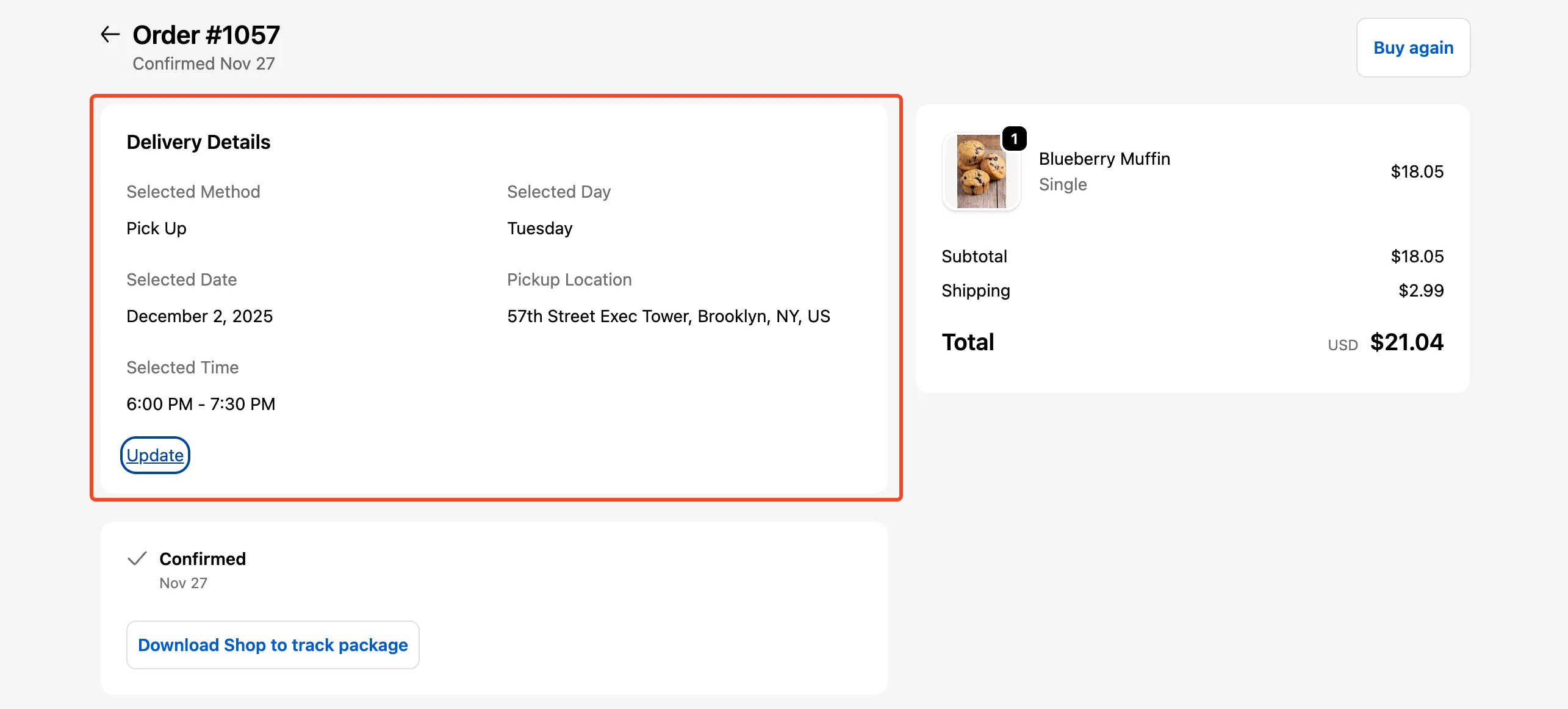
Once you add Bird’s thank-you/order-status block :
- The page clearly shows the selected delivery method, date and time.
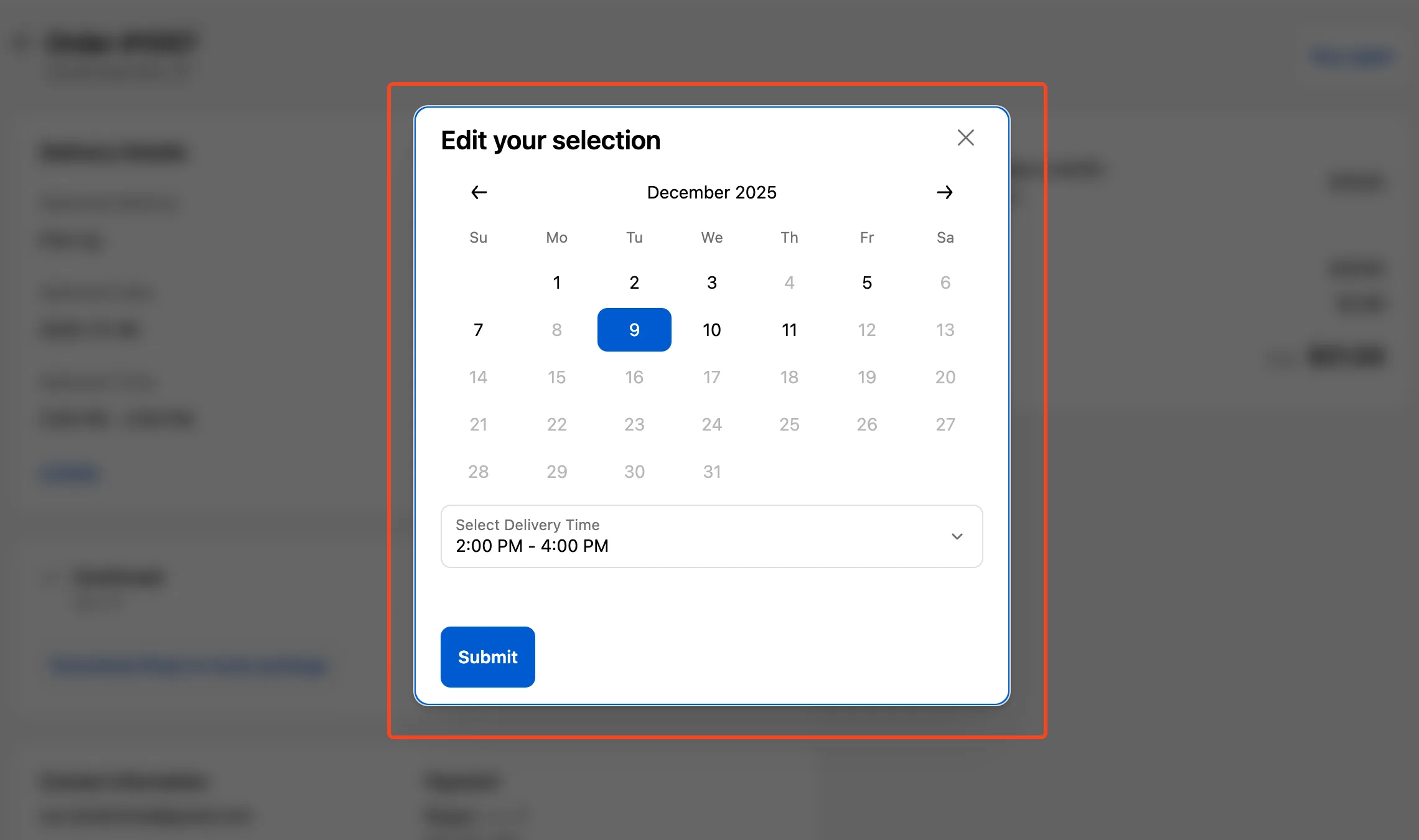
- An “Update” link appears, letting customers open the 'Edit your selection' popup.
- Customers can pick any new slot that is still valid under your rules (lead time, cut-off, order limits, blockouts, product overrides, etc.).
Merchants can also change the schedule themselves—from the Bird dashboard or directly in Shopify Admin—and Bird sends updated notifications so customers always see the latest date/time.
How editing stays within your capacity
Post-checkout editing only works if the new choices don’t break your operations. Bird applies the same rules to edited orders that it does at checkout:
- Preparation times and cut-offs ensure customers can’t move their order into a slot you can’t realistically fulfill.
- Order limits and blockout dates remove unavailable days from the calendar, so customers can’t reschedule into them.
- Product Overrides prevent customers from switching into a slot or method that doesn’t support the products in their cart.
- Max Available Days stops customers from moving orders too far into the future.
When a customer edits their booking, they only see slots that are actually available. You stay in control of capacity, even when customers are changing plans.
What happens to edited orders behind the scenes
Bird keeps edited orders organized so your team doesn’t have to chase details:
- Order Details and filters in Bird and Shopify reflect the updated date/time, so sorting by schedule still works after changes.
- Production reports reflect the latest schedule, helping teams prepare the right items for the right day. A new export will have the latest details.
In short, when the customer updates their slot, your internal views and reports update with it.
Notifications, safety and stale selections
Post-checkout editing is tightly connected to notifications and safeguards. The selections are never out of the base operations of the store. Only the available dates and slots are selectable. Notifying the customer is also a key part of the process. Whether they have updated the Date / Time or someone from the Store has done it for them, the customer gets an order edited email with the updated details.
Benefits: why post-checkout editing matters
Focusing on post-checkout editing delivers a clear set of benefits:
- Customers can fix their own scheduling mistakes instead of contacting support.
- Merchants avoid cancellations and re-orders caused by minor timing issues.
- Capacity rules, limits and blockout dates still apply, so edits never overbook your team.
- Tags, filters, reports and notifications always reflect the latest schedule.
- Time is saved by not having to cater to low value tasks and can be invested to higher value tasks to improve the business.
Bird Pickup & Delivery turns date/time changes from a manual chore into a controlled, self-service workflow—freeing merchants to focus on fulfillment rather than calendar management.
If you need help enabling the feature feel free to refer to our helpdesk article regarding this.
Ready to streamline your pickup and delivery?
Start your 14-day free trial and see how Bird can transform your Shopify store.
Start Free Trial