Shopify Cutoff Times: Stop Stale Delivery Dates

Explore with AI
Get AI-powered insights from this article
A customer selects Saturday delivery in the morning, then finishes checking out that evening. By then your production cutoff has passed, yet Shopify still accepts the order with the original date.
That is how stale delivery dates slip through a Shopify cutoff. Shopify does not re-check whether a delivery date is still valid when a customer comes back to pay. It only knows the date was valid when they first chose it.
Bird Pickup & Delivery, a Built for Shopify app, closes that gap with checkout validation. It confirms the selected date is still valid at the moment of payment, not only when the customer picked it. If the date has gone stale, the customer is asked to choose another available slot before the order goes through.
What is a Shopify delivery cutoff time?
A delivery cutoff is the latest a customer can order for a given delivery or pickup date. Order after the cutoff and that date may no longer be possible, because the shop has already closed its production or dispatch window for it.
This bites hardest for shops that prepare orders for a set date: bakeries, florists, meal-kit makers, grocers, and caterers. We see it most with fresh-food and floral stores, where a next-day order lands after the production window has already closed, only because the customer paid hours after choosing the date.
Why does Shopify let orders through after the cutoff?
A Shopify checkout can stay open for a long time. A customer can choose a date, leave the tab, and return hours or even days later to pay. Shopify treats that returning checkout as valid, which is good for shoppers who wander off and come back. It is not built to re-open the delivery calendar and ask whether the chosen date still makes sense.
There is a deeper reason for this. A delivery date is not something Shopify checkout owns. Native Shopify has no delivery-date field, so the date exists only because a scheduling app added it and saved it to the cart as a cart attribute that travels with the order. At checkout, Shopify carefully validates the things it does own, payment, inventory, and the shipping address, but it has no concept of a date that can expire. Nothing in the standard checkout is watching that attribute. A date chosen this morning is still treated as settled tonight. That is why the fix has to live at the checkout itself, as a validation that re-reads the stored date and compares it against current availability in the moment before payment goes through.
So the date that was correct at 11am rides through unchanged at 8pm. Shopify has no reason to question it, and no native way to. The order lands in your queue looking ordinary, even though the window to prepare it has closed. Stale dates are one of a handful of quiet scheduling problems that come with delivery and pickup on Shopify, and we cover the wider set in our guide to avoiding double bookings and scheduling errors.
What changes when you turn on checkout validation?
| Without checkout validation | With Bird |
|---|---|
| Customer returns after your cutoff | Customer returns after your cutoff |
| The original date stays in the cart | Bird rechecks the date at checkout |
| Shopify accepts the stale date | The stale date is rejected |
| You contact the customer to fix it | The customer picks a new available slot |
| The order enters production too late | The order stays ready to fulfil |
How checkout validation works
When a customer chooses a delivery slot, Bird records when they chose it. Before checkout completes, Bird checks whether that selection is still valid. If it is not, the customer is asked to choose another available date. The check runs through Shopify's own cart and checkout validation, the Shopify Functions layer behind Checkout Extensibility, so it holds where a cosmetic script does not, and it covers pickup, local delivery, and shipping in one rule.
In Bird this is called Selection Expiry, paired with a setting that makes choosing a date mandatory in the first place. You decide how long a selection stays valid: anywhere from 1 to 24 hours. Match it to your cutoff. A same-day bakery kitchen keeps it short, so an evening return forces a fresh pick. A shop with longer lead times can run it longer. Full steps are in Bird's guide to expiring stale delivery and pickup selections.
For the customer it is a quick correction, not a restart. They choose another available date in the date and time picker, and their cart stays intact, so it feels like a small nudge rather than starting over.
How to set it up without code
You do not touch your theme. In Bird's settings you turn on checkout validation, choose how long a selection stays valid, and write the message a customer sees when a date is rejected. To require a date in the first place, follow Bird's guide to making date and time selection mandatory before checkout.
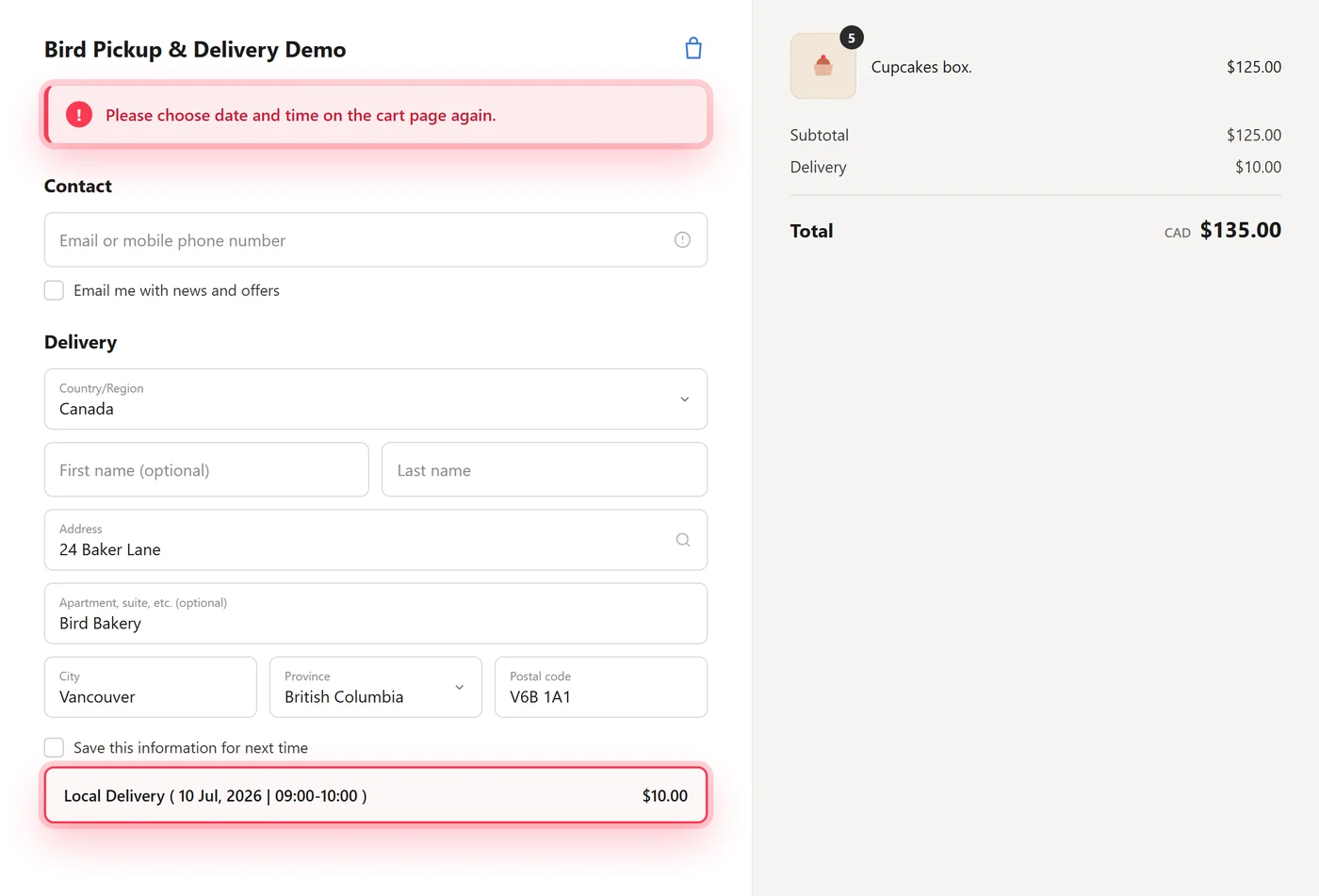
One optional step makes it airtight: turning off Shopify's express and dynamic checkout buttons stops customers skipping the cart page where the date lives, though some shops keep them for the speed they add at checkout, so weigh that against how often dates slip for you.
Once enabled, checkout validation becomes part of the same scheduling workflow as blockout dates for the days you never fulfil and a single-date order flow that keeps the whole delivery calendar honest.
FAQs
Why does Shopify accept orders placed after the delivery cutoff?
A Shopify checkout stays valid after a customer first opens it, and Shopify does not re-check the delivery date when they come back to pay. The date that was available in the morning is still sitting in the cart that evening, so it goes through. A checkout validation has to do that re-check before payment completes.
Does Shopify have native delivery cutoff times?
No. Shopify does not include native delivery-date scheduling or cutoff validation. Delivery dates are added by scheduling apps, which is why merchants need checkout validation to stop outdated delivery selections from going through.
How long can a delivery date stay valid before it expires?
You decide, anywhere from 1 to 24 hours. Match it to how fast your availability changes: a same-day kitchen keeps it short, while a shop with longer lead times can run it longer.
Do I need code to turn this on?
No. It is a setting in Bird, not a theme edit. You turn on checkout validation, choose your window, and write the customer message. We cover the customer-recovery side of this in our guide to reducing cart abandonment with delivery validation.
Every delivery date should still be valid when the customer pays.
Bird rechecks availability at checkout, so no one places an order you no longer have time to fulfil. It keeps pickup and delivery dates accurate for 7,000+ Shopify merchants in 60+ countries, rated 5.0 on the Shopify App Store.
Ready to streamline your pickup and delivery?
Start your 14-day free trial and see how Bird can transform your Shopify store.
Start Free Trial