Mother's Day: The Delivery Day That Breaks Local Shops

Explore with AI
Get AI-powered insights from this article
Last Mother's Day, a bakery in Austin accepted 120 cake orders. Capacity for 60. A florist in Vancouver took 200 bouquet orders — capacity for 80. A cafe in Toronto booked 65 brunch-box pre-orders with a single van. Three shops, three verticals, same ending: teams working until midnight, refunds Monday, a quiet regret that sat through the summer.
Here's what happened to one of them — and the six settings that could have saved her weekend.
Composites — illustrative blends of peak Saturdays across real Shopify shops.
Last updated: April 2026
The Mother's Day Prep Framework
The six Shopify delivery settings every local shop needs dialled in before the second Sunday in May.
- Your Ceiling — daily order limits that match team capacity
- Your Blockouts — blockout dates for days you can't deliver
- Your Slots — delivery time slots with per-slot caps
- Your Prep Time — peak-weekend catalog and lead times
- Your Zones — delivery zones and zone-based pricing
- Your Cut-Off — same-day cut-off times
This guide covers Shopify delivery scheduling for Mother's Day weekend — order limits, blockout dates, time slots, prep time, delivery zones, and cut-off times for florists, bakers, cafes, and restaurants.
The Saturday-morning disaster, unpacked
Meet the Austin bakery composite — Mother's Day Saturday:
6:00 AM. Baker walks in to 120 orders — half same-day pickup, half delivery. Two decorators through a 9-hour shift, minus the wedding already booked, can physically finish 60 cakes before the 2 PM delivery run. She's running 60 short before the morning begins.
10:47 AM. Checkout accepts another same-day cake — 14 km across town, pickup by noon. Driver already committed to four other addresses. Decorator doesn't see the ticket for an hour.
4:30 PM. She starts pulling tomorrow's custom cakes into today. Tomorrow's queue is now also broken. Monday: post-mortem email, regret that sits in the shop for weeks.
Almost every piece of this was preventable. Not with more staff. Not with a bigger van. With six settings.
Mother's Day isn't a marketing problem. It's a math problem.
Industry research shows Mother's Day drives roughly 26% of annual holiday revenue for florists and a 24% sales spike for restaurants vs a typical Sunday. 75% of consumers plan to buy flowers. For local shops with limited staff and delivery capacity, this is not a normal weekend.
Shopify is brilliant at collecting payments — it's not designed to protect your team from itself. Customer clicks "Add to cart," money moves, and the transaction completes. No "but wait, can we actually make this today?" built in. The result every May: shops accept orders they physically can't fulfil. Mothers receive lilies at 8 PM that were supposed to arrive at 11 AM. A 50-review store loses a star in a single weekend.
This isn't a Mother's Day problem. It's a scheduling-gap problem that shows up hardest on every peak day — Mother's Day, Valentine's Day, Christmas weekends, Black Friday, any high-volume Saturday. Mother's Day just exposes it loudest. A local shop with the six settings dialled in turns peak-day chaos into the best revenue weekend of the quarter — team still speaking to each other on Monday.
Imagine instead
Same Saturday. Same store. 6:00 AM — the baker walks in to a queue of exactly 60 cakes. Her ceiling, no more. The cut-off auto-closed same-day pickup at 5 AM. Slots 9–11 AM and 11–1 PM are full; later customers saw 1–3 PM and 3–5 PM and picked accordingly.
The florist across town runs the same play with bouquets. The cafe with brunch boxes. Each shop, its own numbers — same six-setting framework.
4:30 PM — she's finishing her last delivery. Sunday's queue is untouched. Monday: three new five-stars mentioning "on time" or "when promised."
That's not luck. That's the framework.
1. Your Ceiling — Shopify daily order limits that match your team's real capacity
This is the number most Shopify local shops get wrong. They estimate by "how many orders did we do last Mother's Day" — a number already full of chaos. The real ceiling: arrangements, cakes, or brunch boxes your team can physically produce between first prep and cut-off, minus walk-in and phone-order volume.
Industry research gives a sense of scale: most downtown florists handle 40–90 daily orders on a normal day; urban bakeries serve 250–400 customers (mostly walk-ins); florist shops average 1–4 employees. Mother's Day pulls the day's volume to 2–3x baseline while team size stays the same.
For most downtown florists, walk-in and phone orders fill the majority of Mother's Day capacity. Bakeries face the same squeeze — Saturday pickup traffic alone can exceed decorating capacity before online orders get touched. Restaurants face a variant — reservations book out the dining room, and delivery orders compete for the same kitchen throughput. In every case, the online store should be capped at what's left, not the full number.
Bird's daily order limits cap the total orders your store accepts each day. Once the cap is hit, the checkout won't accept another order for that day. The customer isn't lost — they're moved to the next available delivery date.
For the Austin bakery composite: her real Saturday ceiling was 60 cakes, not 120. With the cap set in Bird, the checkout would have paused at order 61 and pushed everyone else to Sunday or Monday. Reviews intact.
"So helpful in allowing us to manage multiple different products' fulfillment and production times." — A Shopify shop using Bird, verified review on the Shopify App Store
2. Your Blockouts — Shopify blockout dates for peak days you can't deliver
Mother's Day weekend usually has at least one day your shop can't deliver — Sunday itself (family time for drivers), Friday before (prep-only, no outbound), or Monday after when the team is wrecked. If you can't deliver it, the checkout shouldn't offer it.
Bird's blockout dates are single-click protection. Close the date at the widget level → stops appearing in the date picker → zero orders arrive for that day. No awkward emails Monday.
Mature shops use blockouts as proactive capacity shaping: Saturday open for the peak. Sunday pickup-only. Monday on a half-slot because the team's on half-day. Customer never sees a conflict because the checkout never offered one.
3. Your Slots — Shopify delivery time slots with per-slot order caps
Delivery or pickup date alone isn't enough on Mother's Day. "May 9" is a 14-hour window — your driver can't honour that, your decorator can't honour that, and customers don't want to wait from 7 AM to 9 PM. They want a 2-hour window.
A cafe — or restaurant running brunch pickups alongside dinner service — builds the day as four or five windows: 9–11 AM, 11–1 PM (the brunch peak), 1–3 PM, 3–5 PM, and 5–7 PM if relevant. Our time slots let you cap each one, so the 11–1 window doesn't quietly take 40 brunch boxes while 3–5 sits at 8.
For restaurants, slots separate "Mother's Day brunch was calm" from "kitchen was buried by 11:45 and dining room emptied late." Cap the first three windows aggressively.
Once a slot hits its cap, it disappears from the picker. "We're stacked between 11 and 1" becomes "11–1 sold out by Tuesday, rest of the day still open."
4. Your Prep Time — Shopify lead times for mixed-product workloads
A single bouquet takes ~15 minutes. A custom wedding centrepiece takes 90. A cupcake order takes 30 minutes to decorate. A three-tier custom cake takes a full day. A brunch-for-four box takes an hour to assemble.
Shopify treats these as identical purchases. Your scheduling system shouldn't.
For peak weekends, decide ahead which products belong on the schedule. Keep simpler items open with same-day cut-offs. Multi-day projects (custom designer work, multi-tier cakes, wedding orders) sit out the peak weekend entirely — offer them Monday or Tuesday at the earliest.
Mother's Day disasters aren't usually about quantity — they're about mix. A shop that does 78 simple items and 4 custom pieces has a manageable day. The same shop with 4 custom pieces sharing the same designer or equipment has a broken one. Curating the peak-weekend catalog prevents mix-collisions.
(For florist-specific setup, our florist's guide to delivery scheduling on Shopify goes deeper.)
5. Your Zones — Shopify delivery zones and zone-based pricing for peak days
Mother's Day is the day you discover your delivery radius is too big. The 2:47 PM order for a 14 km cross-town run is a math loss — driver time + fuel + the late arrival + the one-star review easily exceed the delivery fee collected at checkout.
Shopify's native shipping rates don't distinguish between "5 km same-day run" and "14 km cross-town with three stops in between." A good scheduling system should.
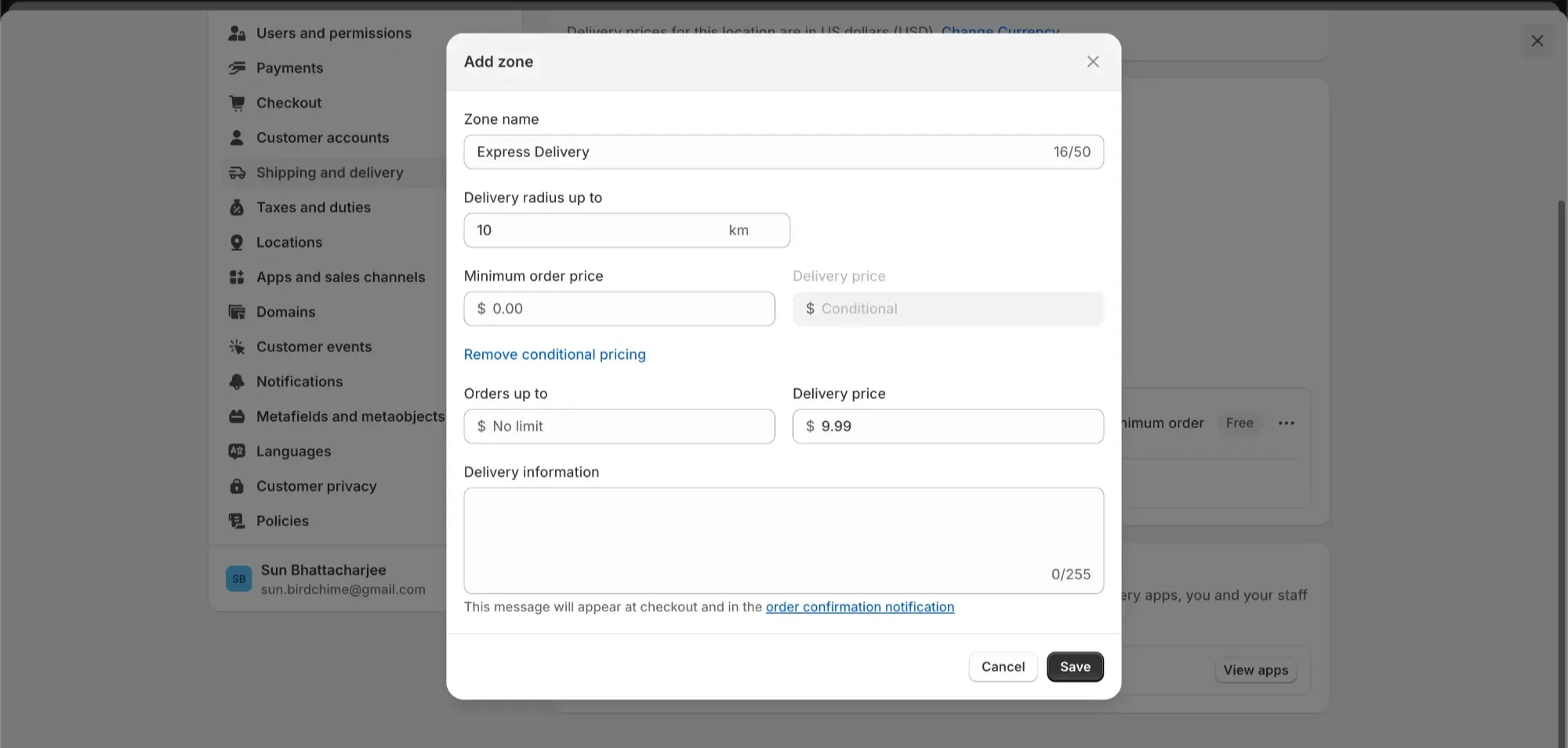
Bird's delivery zones let you build close-in, mid-range, edge, and hard-boundary tiers — priced differently, with different cut-off times per zone, and Mother's Day-specific overrides if you want. Close-in stays open longer; edge-zone closes early because you need routing time.
For restaurants running both brunch delivery and in-house seatings, zones can also differ by service period — close-in delivery stays open through 2 PM for brunch, while the edge tier closes at 11 AM because your drivers need to be back for dinner prep.
On a normal Tuesday the difference is small. On Mother's Day, it's the difference between finishing at 4 PM and finishing at 9 PM.
6. Your Cut-Off — Shopify same-day delivery cut-off times
Every Mother's Day horror story has the same fingerprint: an order accepted too late to be physically possible. Customer clicks at 2:47 PM. Cut-off was "some time in the afternoon." Kitchen had 13 minutes, driver already left for the second run, gift arrived at 8 PM.
A clear cut-off — visible at checkout, enforced at the picker, per-zone if needed — is the boundary between "we delivered on Mother's Day" and "by Mother's Day evening." Bird's cut-offs are zone-aware, so close-in stays open longer than edge.
Enforce it. The customer who sees "cut-off was 10 AM, earliest tomorrow 9 AM" picks tomorrow. Don't offer "you can still buy this today" if you can't honour it.
How you'll know it worked
Track your order-to-dispatch time — the gap between checkout and the order leaving your shop. Pull two timestamps from Shopify admin: payment time, and when you marked the order ready or shipped.
Compare last Mother's Day's average to this one. The smaller the gap, the more capacity you've recovered for your team — and the more on-time deliveries your customers see.
The Mother's Day countdown
Mother's Day 2026 is Sunday, May 10. If you're reading this on publish date, you have 12 days. Here's the minimum — ordered by urgency:
| Day | Action |
|---|---|
| Today (12 days out) | Calculate your real daily ceiling. Apply daily order limits for Saturday May 9 + Sunday May 10. |
| 10 days out | Categorize your products by complexity. Pull anything multi-day (wedding work, multi-tier cakes, custom designer pieces) from the Mother's Day weekend catalog. Test with a dummy order. |
| 7 days out | Build your Saturday and Sunday delivery and pickup slots. Cap each one. Close any blockout dates. |
| 5 days out | Define zones. Set zone-specific cut-offs for the Mother's Day weekend. |
| 3 days out | Full dry run: 10 test orders at different times, products, addresses. Fix whatever looks wrong. |
| 1 day out (Saturday May 9) | Brief the team on the real queue. Share slot-by-slot numbers. Triple-check the cut-off. |
| Mother's Day (Sunday May 10) | Work the queue. Finish strong. |
Without a scheduling system, this checklist takes three evenings of fighting native Shopify and ships with partial coverage. With Bird installed, it's one afternoon — six settings, one session, done. Whether you run a florist shop, bakery, cafe, or restaurant, the framework is the same.
Frequently asked questions
How late can a local shop still set this up before Mother's Day? Up to the day before, but ideally 3–7 days earlier. Bird's settings apply immediately on save. Practically, give yourself the weekend before so you can do the full dry run. A rushed setup that goes live untested is worse than no new setup at all.
Do I need a developer to set up delivery zones and order limits? No — zero code, zero theme edits. A good scheduling system should let you configure all six framework elements from a single settings panel. Full Bird setup takes 7 simple steps — the setup guide walks through each.
What if Mother's Day is tomorrow and I'm reading this now? Set a daily ceiling, close blockout dates, and apply a clear same-day cut-off — in that order. You can still do a lot. Slots, catalog curation, and zones can go in over the next two Mother's Days as you refine.
Does setting order limits turn customers away? No — it turns them toward days you can actually serve them. A customer who sees "Saturday May 9 is full, earliest delivery is Monday May 11" is not a lost customer. She's one you'll make happy. A customer who gets a late cake or a late bouquet is a one-star review.
Atinder Singh is the founder of BirdChime, a Shopify app trusted by 7,000+ merchants in 60+ countries for local delivery and store pickup. He's been building scheduling tools for small shops since 2022.
Ready to run Mother's Day like the 60-cake Saturday instead of the 120-order disaster? Try Bird free for 14 days — no credit card, no migration, live in 7 simple steps. Mother's Day is 12 days away. The setup is one afternoon.
Ready to streamline your pickup and delivery?
Start your 14-day free trial and see how Bird can transform your Shopify store.
Start Free Trial