Appstle Delivery Dates on Shopify: Automate Recurring Orders
Explore with AI
Get AI-powered insights from this article
Appstle bills the renewal. Bird schedules the date. Between them, Appstle subscription delivery dates on Shopify keep moving forward on their own, so week four never goes out against week one's date.
That inheritance is the whole problem. A repeat order pulls its delivery timeline from the original, so the date a customer picked in January rides along on every renewal until something moves it.
Short answer: yes, you can automate Appstle subscription delivery dates on Shopify, and you do not need Shopify Flow to do it. Appstle's own Delivery Date Settings read the delivery date the customer picked at checkout in Bird, then advance it by one billing interval on every renewal. Shopify Flow is the second path, for when you want conditional logic on top.
Bird Pickup & Delivery, by BirdChime, is a Shopify app for scheduling store pickup, local delivery and shipping: delivery dates, time slots, delivery rates, order limits, delivery zones and subscription app integrations. Trusted by 7,000+ Shopify merchants in 60+ countries.
The Appstle recurring delivery checklist
Five things line up before recurring orders schedule themselves.
- Pick a path. Appstle's own settings, or Shopify Flow.
- Match the date field. Appstle reads Bird's checkout date by exact name and format.
- Advance the date. Every renewal moves forward by one billing interval.
- Price it. Renewals default to the cheapest available rate, so rates need carrier-calculated shipping.
- Check the edges. Mixed carts, changed dates, and knowing what moved.
Two steps are worth slowing down for: the date field name, and rates.
Who does what when Appstle and Bird share a Shopify subscription order?
| Piece | What it owns |
|---|---|
| Appstle | The subscription contract and its recurring billing |
| Shopify | The order created on each renewal |
| Bird Pickup & Delivery | The delivery or pickup date, the time slot, the fulfillment method |
| The delivery date attribute | The field both apps read and write, which ties them together |
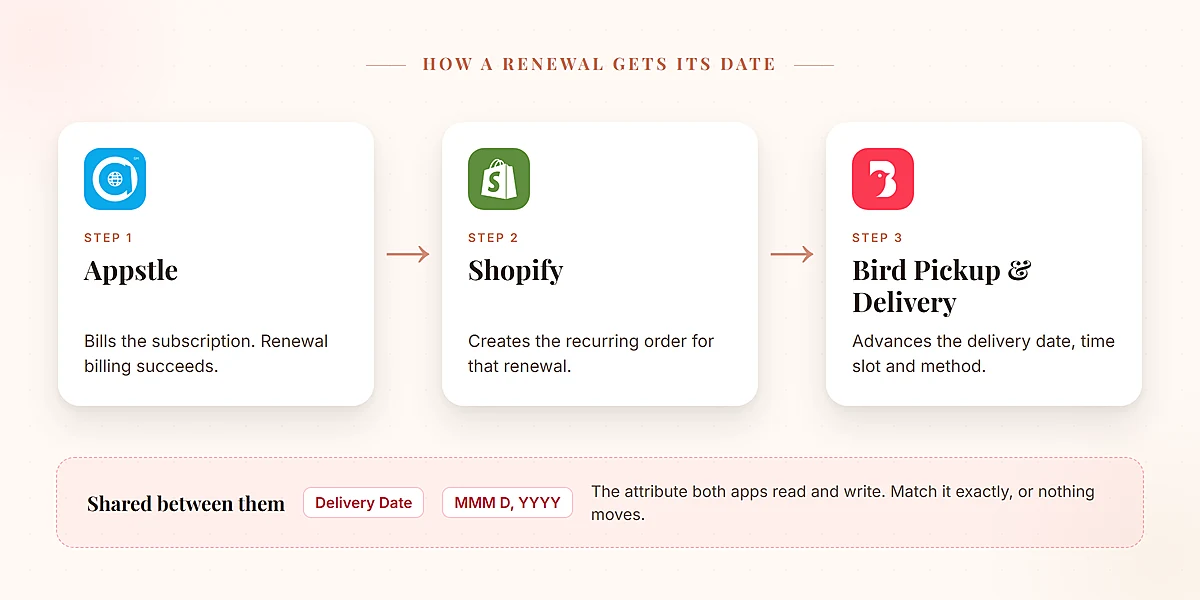
Almost every failure below is that handoff not landing.
Which Appstle delivery date method should you use: native settings or Shopify Flow?
There are two ways to set this up, and configured correctly both reach the same place. On a renewal, the delivery date increments by the billing interval.
| Method | Best for | Complexity |
|---|---|---|
| Appstle native settings | Most merchants. Simple, no-code setup | Easy |
| Shopify Flow | Merchants who need custom logic or advanced control | Intermediate |
Start with the native settings. It is the documented recommendation, and for a shop running weekly or monthly boxes it is the entire job. Reach for Shopify Flow when you want conditions on top, like advancing dates only for certain products.
You do not need both.
How do you set up Appstle subscription delivery dates without Shopify Flow?
This path lives inside Appstle, under Shop Settings, in a block called Delivery Date Settings.
Turn on Use checkout delivery/pickup date for subscriptions. That tells Appstle to use the date the customer picked at checkout for subscription scheduling rather than ignoring it.
Then two fields have to match Bird exactly:
- Delivery date attribute names takes
Delivery Date. It is case-sensitive, sodelivery datewill not match and nothing will move. - Expected date format takes
MMM D, YYYY.
Get either one wrong and the integration can look installed while quietly doing nothing, so double-check both values because the failure may not surface as an error.
Next, enable Set next order date from delivery date so the checkout date drives the next billing date rather than the other way around.
One more toggle matters. Add billing frequency to delivery date is what advances things: with it on, the next order date becomes the delivery date plus one billing cycle, so January 17 on a monthly box becomes February 17. With it off, the delivery date becomes the next order date directly. Update delivery date attribute on contract keeps the stored attribute moving too.
That is the native path. No triggers, no variables. The full setup guide has the field-by-field detail.
How do you automate Appstle delivery dates with Shopify Flow on Shopify?
Take this path when you need conditions the native settings cannot express.
One prerequisite is easy to miss: Bird's Shopify Flow integration has to be switched on inside Bird first, at Settings then Integrations. Until then, no Bird actions appear in the Flow builder. It needs a Bird Growth plan or above, so on Essential those actions never show up at all.
With that on, the workflow is two nodes: Appstle's Subscription Billing Success trigger, then Bird's Increment delivery date action.
The action takes four things. Order comes from order.id. Delivery interval count and delivery interval take {{deliveryIntervalCount}} and {{deliveryInterval}}, mapped from Appstle's trigger variables. That is a real mapping step, not something that happens for you. App Name takes Appstle, so Bird's logs show which workflow moved a date.
Intervals work as a count plus a unit. Weekly is count 1 with Weekly. Bi-weekly is count 2 with Weekly. Monthly is count 1 with Monthly.
Turn the workflow on and dates advance whenever billing succeeds. Disable Bird's Flow integration later and workflows stay put but stop receiving events. Bird's Shopify Flow integration covers what else runs off the same order events.
Why do subscription carts show "Shipping not available" at Shopify checkout?
This can block a launch outright.
The constraint is narrower than it looks, and holding it the wrong way round sends you after the wrong fix. At the first checkout your customer picks from every rate that applies, like any other cart. It is the renewals that are constrained: after the initial delivery, recurring shipments default to the least expensive available method. That is a Shopify rule, not a Bird one.
The checkout error is a separate thing. When Shopify cannot resolve any rate at all for the subscription in the cart, it errors rather than falling back to one, and your customer sees "Shipping not available" on a cart they were ready to pay for.
The fix is carrier-calculated shipping, which lets Shopify request and present a rate it can actually resolve. You enable it in Bird under Rates, in the Rates Engine, and Bird's subscription guide covers the same ground.
Two things to plan for. It converts weights from kilograms to grams, so existing weight-based rates need adjusting. And the entitlement depends on your Shopify plan, which Shopify documents itself:
| Shopify plan | Third-party carrier-calculated shipping |
|---|---|
| Starter | Not available |
| Basic | Not available |
| Grow (previously called Shopify) | Add it for a monthly fee, or switch to annual billing |
| Advanced | Included |
| Plus | Included |
Sort this out before launch day.
What happens with mixed carts, skipped renewals and changed delivery dates?
Mixed carts are the common surprise. When a cart holds a one-time purchase and a subscription product, Shopify runs separate rate calculations for the initial order and the recurring shipments. If your rates carry minimum-value conditions, each has to clear the minimum on its own. A cart that clears it as a whole can still fail on the recurring half, and the error may not make that obvious.
Skipped renewals take care of themselves. No billing means no billing-success event, so nothing fires and the date stays put.
Changed dates stay editable. A customer who wants next Tuesday does not break the chain, because the date can be changed after checkout and the renewal picks up from there. The same applies to time slots, which recurring orders inherit along with the date and fulfillment method. For a meal-kit or grocery shop running standing weekly boxes, that inheritance does most of the work.
Key takeaways
- Appstle owns the money, Bird owns the schedule. Appstle holds the subscription contract and its recurring billing. Bird holds the delivery date, the time slot and the fulfillment method.
- One field connects them: the
Delivery Dateattribute, inMMM D, YYYYformat. - Shopify Flow is optional. Appstle's native Delivery Date Settings are the recommended path, and Flow is there for conditional logic.
- Add billing frequency to delivery date is the toggle that moves the date forward by one billing cycle on each renewal.
- The attribute name is case-sensitive.
delivery datedoes not matchDelivery Date, and the integration fails quietly rather than throwing an error. - Only the renewals are rate-constrained. The first checkout offers every applicable rate; after the initial delivery, recurring shipments default to the least expensive available method. Carrier-calculated shipping is what lets Shopify resolve those rates at all.
- A skipped renewal moves nothing. No billing means no billing-success event, so the date waits for the next actual charge.
Ready to put recurring deliveries on rails? Try Bird free for 14 days.
FAQs
Does Bird's Appstle integration need Shopify Flow?
No. The recommended setup runs entirely inside Appstle's own Shop Settings, with no workflow builder involved. Shopify Flow is the second option, for merchants who want conditional logic on top.
Which subscription intervals work with Appstle delivery dates?
Intervals are a count plus a unit, with Weekly, Monthly and Yearly documented. Weekly is count 1 with Weekly, bi-weekly is count 2 with Weekly, monthly is count 1 with Monthly. On the native path, Appstle applies the billing frequency itself.
Why is my Appstle delivery date not updating?
On the native path, three things have to match exactly: the Use checkout delivery/pickup date for subscriptions toggle is on, the attribute name is Delivery Date with that exact capitalisation, and the format is MMM D, YYYY. On the Flow path, check your Bird plan is Growth or above first, then confirm the workflow is on, Bird's Flow integration is still enabled, and order.id is mapped.
Why do my subscription customers see "Shipping not available"?
Because Shopify cannot resolve a shipping rate for the subscription in the cart, and it errors instead of falling back to one. Worth being precise about what is actually constrained: at the first checkout your customer picks from every rate that applies, and it is only the recurring shipments that default to the least expensive available method. Carrier-calculated shipping gives Shopify a rate it can resolve. Check your Shopify plan supports it, and note weights convert from kilograms to grams once on.
Can subscription orders be store pickup instead of local delivery?
Yes. Recurring orders inherit the fulfillment method from the original timeline alongside the date and time slot, so a weekly pickup box keeps being collected in store on every renewal. The increment behaves the same either way: the date attribute advances, not the method.
What happens to the delivery date if a customer skips a renewal?
Nothing moves, which is correct. A skipped renewal produces no billing-success event, so no increment fires and the schedule waits for the next actual charge.
Does this work the same way as Bird's Recharge integration?
Not quite. Bird's Recharge integration is native inside Bird, while Appstle is configured in Appstle's own settings or through Shopify Flow. The result is the same either way.
In short, Appstle handles the recurring billing while Bird handles the delivery schedule, and the two stay in step through the Delivery Date attribute. Get that field matching and the rates resolving, and the schedule takes care of itself.
Try Bird Pickup & Delivery free for 14 days, or see how the Appstle integration fits your setup. Trusted by 7,000+ Shopify merchants in 60+ countries.
Ready to streamline your pickup and delivery?
Start your 14-day free trial and see how Bird can transform your Shopify store.
Start Free Trial