Shopify Recharge Delivery Dates: Automate Recurring Orders
Explore with AI
Get AI-powered insights from this article
Recharge bills the renewal. Bird schedules the date. Bird automatically advances the delivery date on new Recharge subscription orders while preserving the customer's original pickup or delivery slot and fulfillment method.
Automating a Shopify subscription delivery date used to need a person with a spreadsheet, because a repeat order inherits its whole timeline from the original subscription order. Leave that alone and week four goes out against week one's date.
Bird Pickup & Delivery is a Shopify app for scheduling store pickup, local delivery and shipping: delivery dates, time slots, order limits, delivery zones and rates. Its Recharge integration extends that scheduling to recurring subscription orders, so every renewal carries the right delivery date without anyone editing it by hand.
The Subscription Delivery Loop
Five things have to line up for recurring orders to schedule themselves.
- Connect the Recharge integration inside Bird
- Pass the ID so Recharge tells Shopify which subscription an order belongs to
- Increment the delivery date automatically on every new subscription order
- Price it so subscription carts can actually return a delivery rate
- Audit each change in the subscription log
Connecting Recharge is quick. The two steps that most often need extra configuration are passing the subscription ID to Shopify and setting up rates for subscription carts, so those get a section each below.
How does the Recharge and Bird integration work on Shopify?
Four pieces are involved, and each owns exactly one job.
| Piece | What it owns |
|---|---|
| Recharge | The subscription and its recurring billing |
| Shopify | The order that gets created on each renewal |
| Bird Pickup & Delivery | The delivery or pickup date, the time slot and the fulfillment method |
| Subscription ID | The link that tells Bird which Shopify order belongs to which subscription |
Read top to bottom, that is the entire integration. Recharge owns the billing record, Bird owns the fulfillment date, and the subscription ID is the only thing that ties one to the other. Every failure described below is one of those four pieces not reaching the next.
How do you connect Recharge to Bird Pickup & Delivery on Shopify?
The Recharge integration is native. It lives in Bird under Settings, then Integrations, and connecting it is one Install click that grants access and returns a success toast.
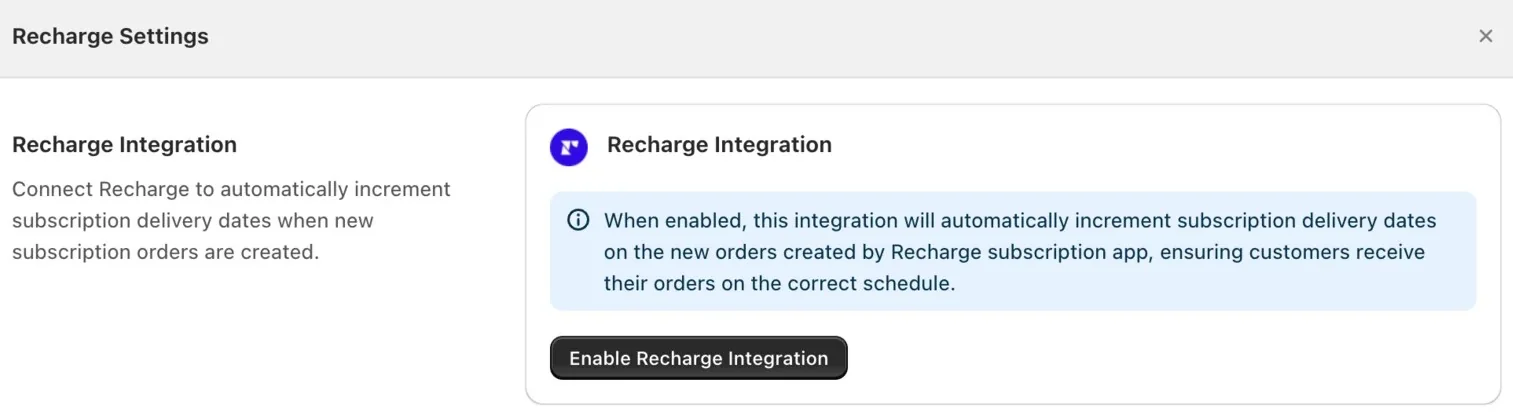
That is the whole Bird side of it. No workflow builder, no trigger mapping, no interval variables to configure by hand. There is one more toggle before dates start moving, and it lives in Recharge rather than here. If you have used our Shopify Flow integration to automate order events, this is the shorter path: Flow is there when you want conditional logic, and the native Recharge connection is there when you just want the dates to be right.
You can also click Disconnect Recharge at any time. The integration stops incrementing dates and nothing else about your scheduling changes.
Why does Bird need the Recharge subscription ID on your Shopify orders?
This is the step that quietly breaks the loop, and it is not in Bird at all. It is in Recharge.
Bird can only advance a delivery date if it can tell that an incoming order belongs to a subscription. Recharge has to stamp that information onto the Shopify order first. In Recharge, under order processing settings, there is an order metadata option for sending additional order data to Shopify. Turn it on.
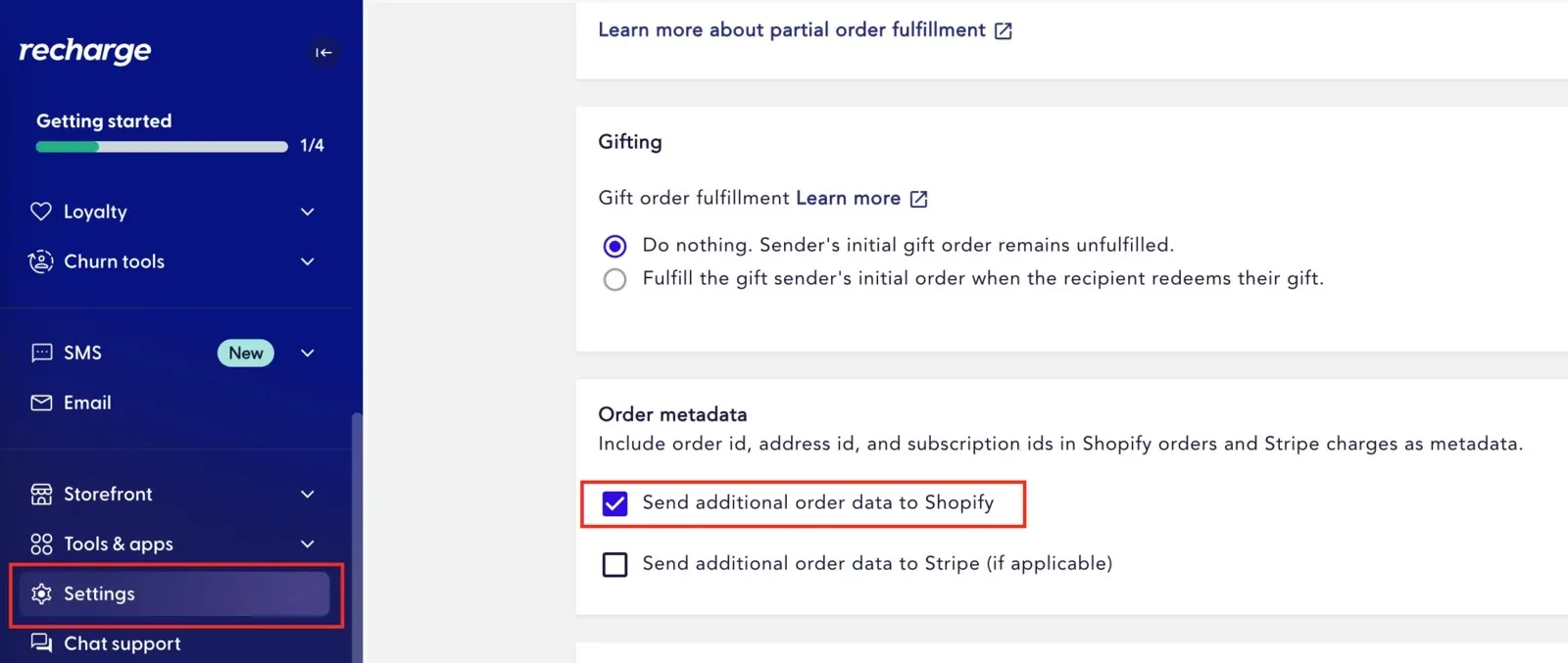
Skip it and everything looks connected on the Bird side while no dates move. The integration reports healthy, the subscription log stays empty, and the first person to notice is a customer whose order shows a date from last month.
How does Bird automatically update delivery dates for Recharge renewals?
Once both sides are on, new Recharge subscription orders get their delivery date incremented to the correct schedule with no manual updates. A weekly subscriber moves forward a week. A monthly subscriber moves forward a month. The customer picked a slot once, at the first checkout, and that choice keeps applying.
Those renewals also land on predictable days, which means your Tuesday can fill with subscription orders before a single walk-in customer places one. Order limits are the guard here. You can cap orders per day, per hour or per time slot, and set those caps separately for each fulfillment method and each location, so a coffee subscription renewing across two shops does not quietly eat the capacity your custom orders need. If one location handles roasting and the other only does pickup, cap them differently.
Do recurring Recharge orders keep the customer's pickup or delivery time slot?
Yes. Recurring orders inherit the delivery or pickup date, the time slot, and the preferred fulfillment method from the subscription timeline. A customer who chose Saturday morning pickup in January is still on Saturday morning pickup in June without being asked again. Only the date advances, and it advances to match their billing cadence.
That is also why the automation matters. Because a renewal inherits the previous timeline rather than generating a fresh one, an unincremented order does not arrive blank. It arrives confidently wrong, carrying a date that has already passed.
Why does Shopify show "Shipping not available" for Recharge subscription orders?
This next failure has nothing to do with dates. It happens at checkout, before the order even exists.
The constraint here is narrower than it looks, and having it the wrong way round sends people after the wrong fix. At the first checkout your customer chooses from every shipping rate that applies to their order, exactly like any other cart. It is the renewals that are constrained: after the initial delivery, recurring shipments default to the least expensive available method. The failure is separate from both. When Shopify cannot resolve any rate for the subscription in the cart, it does not fall back to one. It throws an error, and your customer sees "Shipping not available" at the exact moment they were ready to buy.
The fix is carrier-calculated shipping, which lets Shopify calculate and present rates properly for subscription orders instead of stalling.
How do you configure delivery rates for Shopify subscription orders?
Enable carrier-calculated shipping in Bird's rates engine, then account for three things it changes.
| What changes | What to do about it |
|---|---|
| Carrier-calculated shipping converts weights from kilograms to grams | Adjust any weight-based rate rules to match, or they will not fire |
| A cart holding both a one-time item and a subscription item gets separate rate calculations | If your rates have minimum order value conditions, the initial order and the recurring shipments each have to clear them on their own |
| Availability depends on your Shopify plan | Shopify includes carrier-calculated shipping on Advanced and Plus. On Grow it is an add-on for an extra monthly fee, or included if you move to annual billing. Other plans do not offer it. |
That middle row is the one that surprises people. A customer adds a subscription coffee and a one-off bag of beans, the combined cart clears your delivery minimum, and the renewal shipments still fail because on their own they do not. Check both halves against your conditions, not just the total.
How do you verify that subscription delivery dates updated?
Bird keeps a subscription log, and it is specific enough to settle a question from a customer.
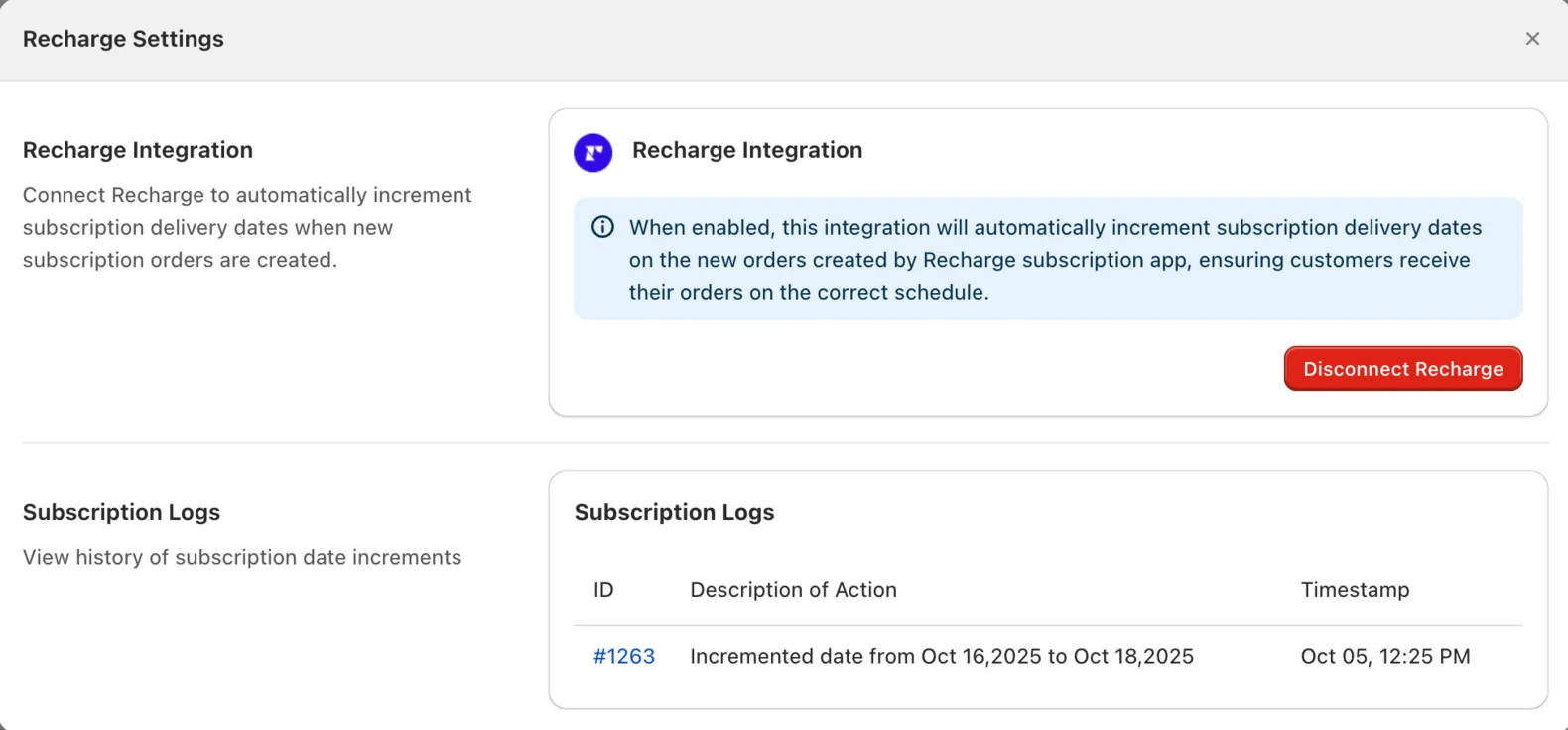
Every change gets a row: the order ID as a clickable link straight into the Shopify order, a description of what happened, and a timestamp. Each description names both dates, the one the order moved from and the one it moved to, so you are reading the actual before and after rather than inferring it. The size of the jump follows whatever cadence that subscription runs on.
If the log is empty, place a new subscription order through Recharge to trigger the first entry. An empty log on a store with no renewals since you connected means nothing has happened yet, not that something is broken. Once entries are flowing, the log plus your order list covers the two questions you will actually get asked: did this customer's date move, and when.
Start with the loop, not the toggle
Subscription revenue is the most predictable revenue a local shop can build, and it only stays predictable if the fulfillment side is as automatic as the billing side. Recharge already made the money recurring. Connecting it to Bird makes the date recurring too, and then the five steps above stop being a project and go back to being a setting you configured once.
If you run Appstle rather than Recharge, the same delivery date automation is available through a slightly different route, covered in our Appstle subscriptions integration post. And if you want to build the automation yourself with conditions and branching, Bird's Shopify Flow integration exposes an increment delivery date action you can wire into any workflow.
Bird Pickup & Delivery is trusted by 7,000+ Shopify merchants in 60+ countries. You can install it from the Shopify App Store and try it free for 14 days, and the full walkthrough for this integration lives in the Recharge integration guide.
Frequently Asked Questions
Can I use Recharge subscriptions with Shopify pickup and delivery?
Yes. Bird connects Recharge subscription orders to Shopify pickup and local delivery scheduling. The customer chooses their fulfillment method and their delivery or pickup slot during the initial subscription checkout, and every recurring order keeps those preferences while the delivery date advances to match the subscription cadence.
Can Recharge automatically update the delivery date for recurring Shopify orders?
Recharge manages the recurring billing. Bird adds the fulfillment-date automation, incrementing the delivery date on new subscription orders. With Bird's Recharge integration enabled, renewals get the correct delivery date with no manual updates.
Does Bird require Shopify Flow to work with Recharge?
No. Recharge connects natively inside Bird under Settings, then Integrations, with a single Install step. Shopify Flow is an alternative route for merchants who want custom conditions or branching logic, and enabling Bird's Flow integration requires the Growth plan or above. For straightforward delivery date increments on Recharge renewals, you do not need it.
What happens if the Recharge subscription ID is not passed to Shopify?
Bird cannot tell which Shopify orders are subscription renewals, so no delivery dates advance and the subscription log stays empty even though the integration looks connected. Enable the order metadata option in Recharge's order processing settings, which sends additional order data to Shopify and puts the subscription ID on the order.
Do recurring Recharge orders keep the customer's time slot and fulfillment method?
Yes. Repeat orders inherit the delivery or pickup date, the time slot, and the preferred fulfillment method from the original subscription timeline. Your customer chooses once at the first checkout and that preference carries into every renewal, with only the date advancing.
Why do my subscription customers see "Shipping not available" at checkout?
Because Shopify cannot resolve a shipping rate for the subscription in the cart, and it throws an error rather than falling back to one. It is worth being precise about what is actually constrained: at the first checkout your customer picks from every rate that applies, and it is only the recurring shipments that default to the least expensive available method. Enabling carrier-calculated shipping in Bird's rates engine lets Shopify calculate rates properly for subscription carts.
Can I use Bird's delivery rates with Recharge subscriptions?
Yes, with one constraint worth designing around: after the initial delivery, recurring shipments default to the least expensive available shipping method, so the rate a customer picks at the first checkout is not the rate their renewals run on. Carrier-calculated shipping is what allows Shopify to calculate and present those rates for subscription carts. It also converts weights from kilograms to grams, so weight-based rate rules need adjusting to match.
What happens when a cart has both a subscription and a one-time product?
Shopify generates separate rate calculations for the initial order and for the recurring shipments. If your rates carry minimum order value conditions, both have to meet those conditions independently. A mixed cart can clear your minimum as a whole while the recurring shipments fail on their own, so check each half rather than the combined total.
Can Bird apply subscription order limits per location?
Yes. Order limits can be set per day, per hour or per time slot, and configured separately for each fulfillment method and each location. That matters for subscriptions because renewals cluster on predictable days, so you can cap how much of a given day's capacity recurring orders take at each location while leaving room for walk-in and one-off orders.
Can I use Bird with Appstle instead of Recharge?
Yes. Appstle reaches the same result through a different route, either through Appstle's own delivery date settings or through a Shopify Flow workflow using Bird's increment delivery date action. Our Appstle subscriptions integration post covers that setup.
Can I turn the Recharge integration off later?
Yes. Click Disconnect Recharge in Bird's integration settings at any time. Delivery date increments stop immediately and the rest of your pickup, delivery and shipping scheduling is unaffected.
Ready to streamline your pickup and delivery?
Start your 14-day free trial and see how Bird can transform your Shopify store.
Start Free Trial