Shopify Peak Season 2026: Pickup & Delivery Prep Guide

Explore with AI
Get AI-powered insights from this article
Black Friday gets the headlines. Christmas Eve is the day that breaks the kitchen.
You know the feeling if you've lived it. It's 5 AM, the ovens are on, and the order list is longer than it was when you went to bed. Every one of those orders was a yes. Some of them were a yes you couldn't really afford to give. By noon there's a line out the door, the phone won't stop ringing, and someone is asking if their cake is ready yet. It isn't.
Nobody opens a shop to feel like that. And the hard truth about peak season is that the trouble usually isn't too few orders. It's saying yes to more than your team can make.
Preparing your Shopify store for peak season comes down to one decision you make calmly in October, so you don't have to make it in a panic in December: how many orders can we really handle, and on which days? Get that right and the rest of the season gets a lot quieter.
The Peak Season Playbook
Six steps to get your Shopify store ready for holiday pickup and delivery:
- Block your closed days so nobody books a day you're shut
- Set how many orders you can handle per day and per time slot
- Give products enough preparation time so big orders aren't booked for tomorrow
- Set clear holiday ordering deadlines and tell customers early
- Adjust delivery prices for busy days and give people a reason to pick up
- Keep customers updated on their orders so they stop calling to ask
This guide is for bakeries, florists, butchers, grocers, cafés and gift shops that hand orders over at the counter or on their own van. One honest note before we start: Shopify takes the order and the payment beautifully, but on its own it won't stop you from taking too many. That part needs a scheduling app. We make one, Bird Pickup & Delivery, so you'll see how each step works in Bird along the way.
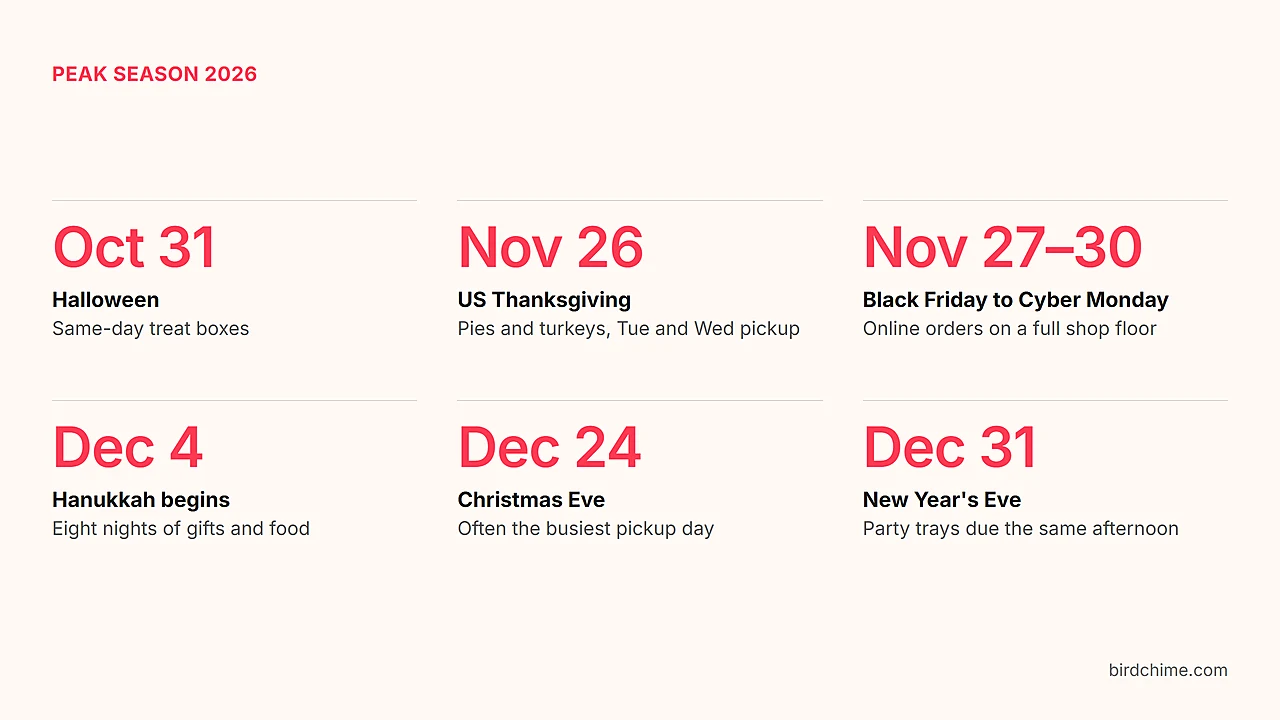
Shopify holiday calendar 2026: which dates should you prepare for?
Here's how the season falls this year, and what tends to go sideways on each day.
| Date | Holiday or Event | What usually goes wrong |
|---|---|---|
| Saturday, October 31 | Halloween | Everyone wants same-day pickup for treat boxes and themed cakes |
| Thursday, November 26 | US Thanksgiving | Pies, turkeys and dinner orders all squeezed into Tuesday and Wednesday pickup |
| November 27–30 | Black Friday to Cyber Monday | Online orders jump while the shop floor is already packed |
| Friday, December 4, at sundown (first full day December 5) | Hanukkah begins | Gift and food orders for eight nights, starting on a Friday |
| December 24–25 | Christmas Eve and Christmas Day | Often your busiest pickup day of the year, then a day you're closed |
| Thursday, December 31 | New Year's Eve | Party trays, cakes and flowers, all wanted the same afternoon |
Black Friday weekend is still huge. Shopify merchants sold $14.6 billion over Black Friday Cyber Monday 2025. But if you run a local shop, you already know the weekend isn't the hardest part. The weeks after it are.
Outside the US? The steps are the same. Swap in your own dates: Boxing Day on December 26 for shops in Canada, the UK, Ireland and Australia, plus your local carrier deadlines.
The Peak-Season Capacity Check: how many orders can your shop really take?
Before you type a single number into your store, sit with this for a minute: your real limit is set by the weakest link in your day, not the strongest.
Your kitchen might be able to bake 100 orders. But if your van can only get 60 to people's doors before dark, then 60 is your delivery limit. Promise 100, and 40 families are waiting at the window on Christmas Eve.
Go through these six questions with your team. (The numbers are one bakery's example. Yours will be different.)
| Check | Ask yourself | Example (one bakery) |
|---|---|---|
| Production | How many orders can we make in a day? | 80 online orders after walk-in customers |
| Time slots | How many can we hand over in each window? | 20 per two-hour pickup slot |
| Preparation | How much notice does each product need? | 2 to 3 days for a decorated cake |
| Stock | Will we have the ingredients or supplier stock? | Turkey order confirmed with the supplier |
| Delivery | How many drops can the van make on time? | 30 a day |
| Staff | Can the people on shift actually do this? | Fewer hands on Christmas Eve |
Whichever answer is smallest, that's your number. It might feel low. That's fine. A smaller number you can keep is worth more than a big one that ends in apologies.
1. How do you block closed days on Shopify?
Block every day you won't be open, for pickup, delivery or both, before anyone has a chance to book it.
It sounds obvious. But the customer who books Christmas Day pickup at a shop that's closed on Christmas Day isn't just a lost sale. It's a refund, an awkward phone call on your one day off, and sometimes a bad review you'll read every time you open your laptop.
So start with the easy ones:
- Thursday, November 26, if you're a US shop closing for Thanksgiving
- Friday, December 25
- Saturday, December 26, if you close for Boxing Day
- Friday, January 1, 2027
- Any day you're short on staff or your supplier isn't delivering
Think about pickup and delivery separately. Plenty of bakeries open for Christmas Eve morning pickup but stop delivering at noon so the driver gets home to their own family.
If you have more than one shop, decide for each one. With multi-location support, every store keeps its own calendar. And once you've added your blockout dates, those days simply show as unavailable when customers pick a date. Nobody has to ask, and you don't have to explain.
2. How do you limit Shopify orders per day during peak season?
Take the number from your capacity check, make it your daily limit, then spread it across time slots so the day doesn't all land at once.
Here's the uncomfortable bit. Shopify will happily take the 120th order on a day your team can finish 80. It doesn't know how many ovens you have, or that your best decorator is off sick. Every extra yes becomes someone's late night.
Say your bakery can make 80 online orders a day after walk-in customers are served. (That's an example, so use your own number.) Split it across four pickup time slots:
| Pickup slot | Order limit |
|---|---|
| 8 AM–10 AM | 20 |
| 10 AM–12 PM | 20 |
| 12 PM–2 PM | 20 |
| 2 PM–4 PM | 20 |
| Daily total | 80 |
When a slot fills, it quietly disappears and the next customer picks another time. When all four fill, the day closes. No one gets turned away at the counter. They just book a day you can do well. Here's what customers see when a slot is full.
On your biggest days, do the brave thing: lower your limit instead of raising it. Christmas Eve brings your biggest walk-in crowd of the year, so that bakery might drop its online limit from 80 to 60 and keep the ovens free for the people standing in line.
Florists feel this one in the van. A team might be able to arrange 60 bouquets and wreaths in a day but only deliver 30 before dark. So delivery gets its own limit, and pickup gets a separate one based on how many people the counter can serve. If you run two stores, set order limits for each, so a sold-out downtown shop never stops someone booking the quieter one across town.
3. How do you set preparation times for different Shopify products?
Give each slow product its own preparation time, so customers can only choose dates your team can actually meet.
A loaf of bread might be ready the same day or the next. A decorated Christmas cake can need 2 to 3 days, depending on your kitchen. A butcher can wrap steaks while you wait, but a whole turkey has to be ordered from the supplier days ahead. Put all of those on one preparation time and something has to give: either you turn away easy orders, or you accept ones you can't make.
With product-specific scheduling, your slow products get their own notice and their own pickup days, and everything else stays as it is. A bakery might set:
- Everyday bread and pastries: ready the next day
- Thanksgiving pies: two days of preparation, pickup on November 24 or 25
- Christmas cakes: three days of preparation, pickup up to December 24
Florists can do the same for big arrangements and event orders. Butchers can match their notice to the supplier's schedule.
Then, once the orders roll in, production reports add up how many of each item are due on each day. You see Wednesday's pie count on Monday, with time to order more butter, instead of finding out at 5 AM.
4. How do you set Shopify pickup and delivery cutoff times?
Decide the last moment you can take an order and still do it properly, then tell customers well before the rush.
People will happily order early if you tell them early. Put your deadlines on your homepage, your product pages and your emails before November. For example, a bakery might:
- Close same-day pickup orders at 10 AM
- Take Thanksgiving pie orders until November 22, so every pie gets at least two days of preparation before pickup on November 24 or 25
- Take Christmas cake orders until December 21, which gives each cake its three days
These are examples. Set yours around what your team can do. Our guide to Shopify delivery date cutoff times walks through the setup.
Pickup and shipping need different deadlines. Pickup only depends on you. Shipping depends on a courier who is just as swamped as you are in December, so give yourself a couple of days' breathing room before their last posting date.
Stop customers checking out with a pickup time that's already gone
Holiday shoppers browse for days. Someone picks a 12 PM Christmas Eve pickup on Sunday, leaves the tab open and comes back on Tuesday. By then that slot filled up long ago. Without a safety net, their order goes through anyway, and now you've got one more cake than you have room for.
Bird's selections expiry clears an old date and time after a set period, so the customer has to choose a slot that's still open before they pay. It's a small thing that saves one very stressful conversation.
5. How should Shopify stores price holiday delivery and encourage pickup?
Delivery costs you more in December, so decide how to cover it: charge a little more on your busiest days, set a minimum order for delivery, make pickup cheaper, or mix all three.
Think about what one December delivery really takes. Slow traffic. Fewer drops an hour. Someone pulled off the counter to drive. Charging the same as a quiet Tuesday in February means you're paying for the busiest days out of your own pocket.
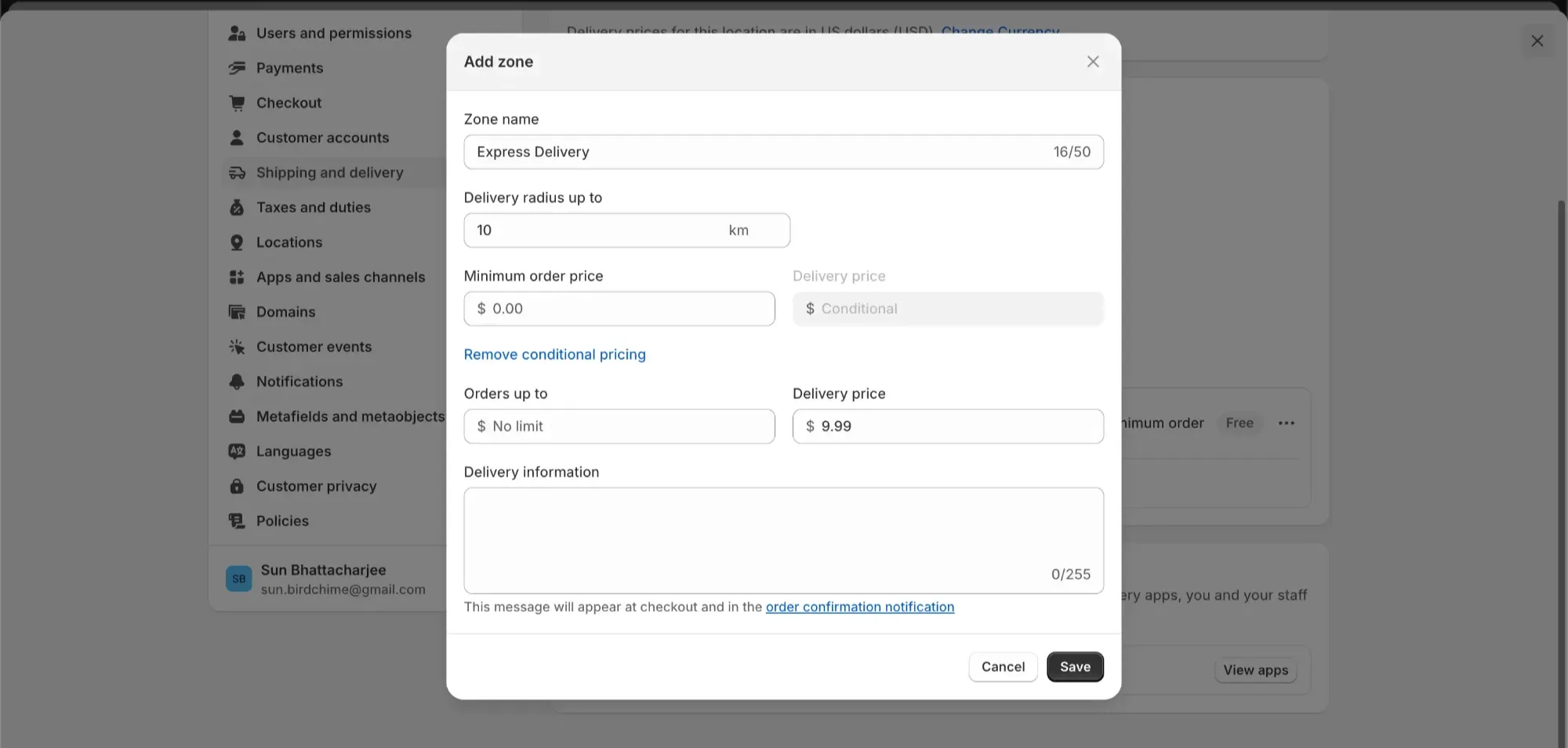
- Charge more on the busiest dates. With delivery rates that change by date, you can add a holiday charge to just the days that need it. You can also combine conditions, like free delivery above a set order value on every day except Christmas week.
- Set a minimum order for delivery, so a single cookie doesn't take up a whole van run.
- Make pickup the easy choice. A small pickup discount gives people a reason to come to you, and every pickup is one less stop for a van that's already running late.
Customers see any extra charge at checkout, next to the date they chose. No surprises, no awkward emails afterwards.
6. Which pickup and delivery notifications cut down "is my order ready?" calls?
Tell customers the moment their order is ready or on its way, so they don't have to call, message or stand at the counter to ask.
In the middle of a rush, every "just checking on my order" call pulls someone away from the person in front of them. Most of those calls are really one question: is it ready?
Shopify already sends the order confirmation once the order is placed. Bird adds the messages customers are actually waiting for: pickup and delivery emails for ready for pickup, out for delivery and delivered. In the US, UK, Canada and Sweden, at the time of writing, you can send the same updates as text messages. Your team marks an order ready, and the customer hears about it straight away.
Put your holiday deadlines and any changes to opening hours on your website and in your marketing emails, since those aren't order updates. And if your team plans the day from a shared calendar, Bird can send orders to Google Calendar, so the driver and the counter are working from the same list.
Shopify peak season 2026: your preparation checklist
You don't have to do it all today. Here's a gentle timeline.
| By when | What to do |
|---|---|
| By October 18 | Run the capacity check. Block your closed days. Set daily and per-slot order limits. |
| By October 25 | Set preparation times for Halloween cakes and treat boxes. |
| By November 1 | Set Thanksgiving preparation times and open pre-orders. |
| By November 15 | Publish your holiday deadlines. Review delivery prices. Place a real test order to check notifications. |
| November 22 | Close Thanksgiving pie orders. |
| November 26–30 | Thanksgiving, then Black Friday to Cyber Monday. Change nothing mid-weekend. Breathe. |
| December 1 | Open Christmas pre-orders. Lower your Christmas Eve online limit. |
| December 21 | Close Christmas cake orders. |
Move the dates to fit your shop, your local holidays and your suppliers.
Give yourself a calmer December
The shops that come out of peak season still smiling aren't the ones with the most staff. They're the ones who decided their limits in October and let their checkout say no for them.
So here's one thing to do this week. Sit down with your team for half an hour, with a coffee, and agree on four numbers:
- Which days are you closed?
- How many orders can you handle in each time slot?
- How much notice do your biggest products need?
- What's the last day customers can order?
Then put those numbers into your store. That half hour is what lets you enjoy some of your own holidays this year.
Bird Pickup & Delivery helps Shopify shops set all six steps in one place. Try it for 14 days for free and have everything ready before the rush.
Related guides
- Managing the holiday rush on Shopify
- How to add holiday delivery surcharges without losing customers
- Black Friday and Cyber Monday with Bird Pickup & Delivery
FAQs
When should I start preparing my Shopify store for the 2026 holiday season?
For 2026, start by October 18: run your capacity check, block your closed days and set your order limits. Then finish your Thanksgiving settings by November 15 and close Christmas cake orders around December 21.
How many orders should I accept per day during the holidays?
Only as many as the weakest part of your day can handle. Look at production, time slots, preparation, stock, delivery and staff, and take the smallest number as your online limit once walk-in and phone customers are counted. On your busiest walk-in days, like Christmas Eve, go lower.
How do I stop customers from booking a full pickup slot on Shopify?
Give each pickup time slot an order limit. When a slot is full, it should disappear from the date and time picker so new customers only see times with room. For someone who picked a slot days ago and comes back after it filled, selections expiry clears the old choice so they pick an open slot before paying.
How far in advance should customers order holiday cakes, turkeys, or flower arrangements?
It depends on what you make and how busy your team is. For example, a bakery might ask for 2 to 3 days on a decorated cake, a butcher might need several days for a whole turkey, and a florist might want a few days for a large arrangement. Set each product's preparation time to what your team can reliably do.
Can I set different pickup and delivery limits for each Shopify store location?
Yes. Each location can have its own daily and per-slot limits, its own closed days and its own schedule, so a busy downtown shop never blocks bookings at a quieter one.
Which Bird plan do I need for peak-season scheduling?
It depends on how much control you need. At the time of writing, closed days, time slots, minimum order values, price-based delivery rates and pickup discounts are on every plan. Order limits, product preparation times, date-based holiday rates, production reports and Google Calendar start on the Growth plan. Every plan includes a 14-day free trial, so you can set everything up and see it working before you pay.
Ready to streamline your pickup and delivery?
Start your 14-day free trial and see how Bird can transform your Shopify store.
Start Free Trial